
Every year, lakhs of graduates step into the job market with the same degree, the same resume format and, often, the same list of certificates. The ones who get shortlisted are rarely the ones with the most certificates. They are the ones who can show practical IT skills that match what a team actually needs on day one.
This guide covers the IT skills for freshers in 2026 that employers are most likely to look for, written for students, final-year graduates, career switchers and job seekers. For each skill you will see why it matters, what to learn first, and a small project you can build to prove it.
By the end, you will have a clear priority list, a role-to-skill map, and a 90-day plan you can start this week.
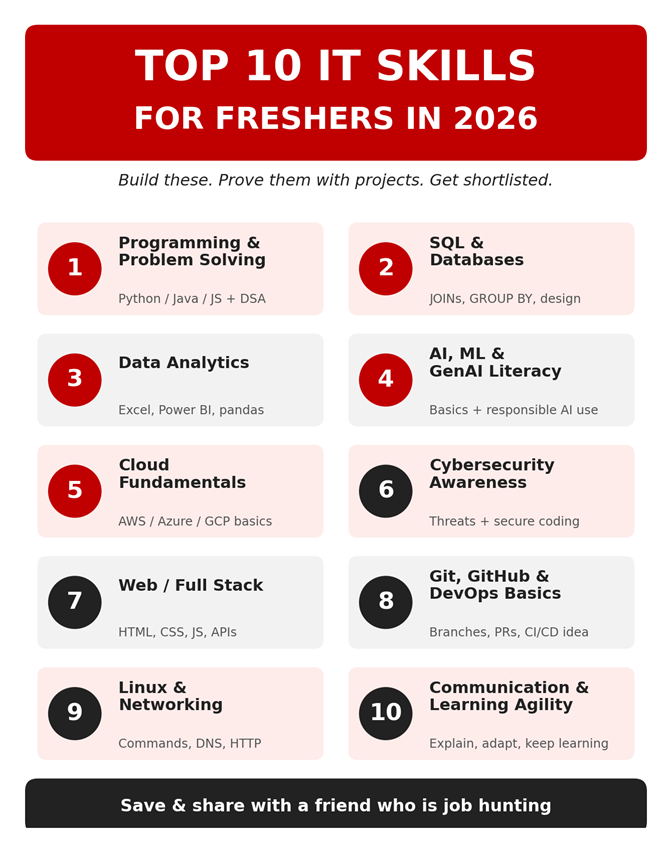
Figure: Top 10 IT skills for freshers in 2026 (save and share)
Why 2026 Is Different for IT Freshers
A few years ago, a fresher could get through many interviews by memorising definitions. That is getting harder. AI assistants can now draft code, write queries and summarise documents in seconds, so employers are paying closer attention to something else: can this person check the output, fix it and explain it?
That shift changes how you should prepare. Three practical points follow from it:
• Fundamentals matter more, not less. If you cannot read code, you cannot tell when an AI-generated answer is wrong.
• Proof beats claims. A working project with a clear README says more than a line on your resume that reads "good knowledge of Python".
• Learning speed is a skill. Tools and frameworks change often. Employers value freshers who can pick up a new tool in a week and explain what they learned.
The rest of this guide is built around these three points.
What Are Companies Actually Looking for in Freshers?
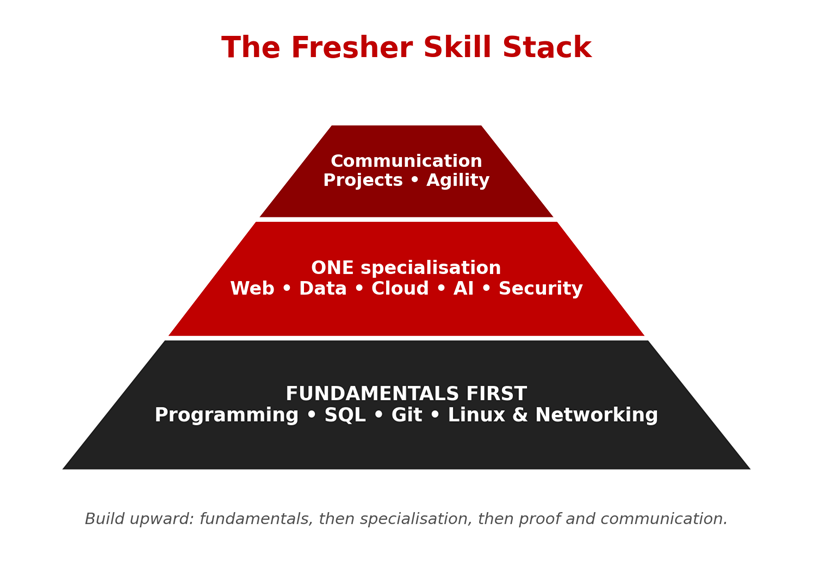
Hiring teams do not expect a fresher to know everything. They look for three things: a solid base in one programming or data skill, proof that you can learn new tools quickly, and the ability to explain your work clearly. Think of the skills below as a stack. You do not need all ten at an advanced level, but you should be strong in two or three and familiar with the rest.
|
Verified fact: what the WEF Future of Jobs Report 2025 says The report lists AI and big data, networks and cybersecurity, and technological literacy as the three fastest-growing skills through 2030. It also expects creative thinking, resilience, flexibility, curiosity and lifelong learning to keep rising in importance. Summaries of the report also state that around 59% of the global workforce will need reskilling or upskilling by 2030. Source: World Economic Forum, The Future of Jobs Report 2025 (weforum.org). |
The Top 10 IT Skills for Freshers in 2026
1. Programming Fundamentals and Problem Solving
This is still the entry ticket for most technical roles. Companies want to see that you understand variables, loops, functions, object-oriented concepts and basic data structures, not just that you have memorised syntax.
Aim for the level where you can solve an easy-to-medium problem without looking up the answer, and explain your approach out loud. Interviewers often care more about how you think than whether you reach the perfect solution.
• What to learn: one language well (Python, Java or JavaScript), plus arrays, strings, recursion, sorting and searching.
• Prove it: solve 40 to 60 practice problems and build one command-line tool, such as an expense tracker.
• Tools to use: VS Code or an IDE of your choice, and the practice sections of coding platforms such as HackerRank or LeetCode.
• Questions to expect: Difference between an array and a linked list? Explain object-oriented concepts with an example. Reverse a string without built-in functions.
2. SQL and Database Basics
Almost every business application stores data in a database, so SQL appears in developer, tester, analyst and support roles alike. It is also one of the fastest skills for a fresher to learn.
A common fresher mistake is knowing the definition of a JOIN but never writing one. Practise on real tables until writing queries feels natural.
• What to learn: SELECT, WHERE, JOINs, GROUP BY, subqueries, and how tables relate to each other.
• Prove it: design a small database for a library or an online store and write ten useful queries against it.
• Tools to use: MySQL, PostgreSQL or SQLite, plus any free sample database.
• Questions to expect: Difference between INNER JOIN and LEFT JOIN? Find the second highest value in a column. What is normalisation?
3. Data Analytics (Excel, Power BI or Tableau, Python)
Businesses want people who can turn raw numbers into decisions. Even non-data roles value freshers who can clean a dataset and present a clear chart.
You do not need advanced statistics to begin. Learn to ask a clear question, clean the data, and show the answer in a chart that a manager can understand in ten seconds.
• What to learn: advanced Excel, one dashboard tool, and Python libraries such as pandas.
• Prove it: publish a dashboard built on an openly available dataset, with three written insights.
• Tools to use: Excel or Google Sheets, Power BI or Tableau, and Python with pandas in a Jupyter notebook.
• Questions to expect: How do you handle missing values? When would you use a bar chart instead of a line chart? Walk me through your dashboard.
4. AI, Machine Learning and Generative AI Literacy
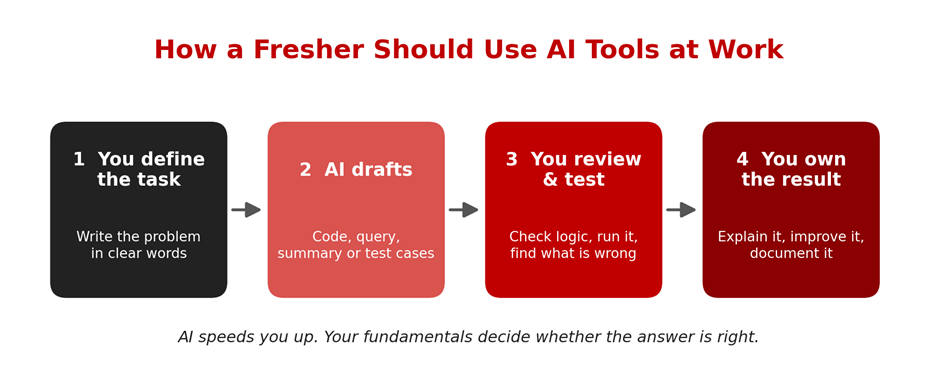
This is the skill area the WEF report places at the top of the growth list. For freshers, the realistic goal is not to build advanced models. It is to understand how AI tools work, where they fail, and how to use them to work faster and more accurately.
Employers increasingly expect responsible use: never paste confidential data into a public tool, always verify the output, and be able to explain the answer without the tool in front of you.
• What to learn: basic ML concepts (training, testing, overfitting), a simple model in Python, and responsible use of generative AI tools.
• Prove it: build a small prediction project and document what the model gets wrong.
• Tools to use: Python with scikit-learn, Jupyter notebooks, and a generative AI assistant as a learning aid.
• Questions to expect: What is overfitting? Supervised vs unsupervised learning? How do you check whether an AI-generated answer is correct?
5. Cloud Computing Fundamentals
Applications increasingly run on cloud platforms such as AWS, Microsoft Azure and Google Cloud. Freshers who understand the basics are easier to onboard into development, DevOps and support teams.
Start with one provider. The concepts transfer, because compute, storage, networking and identity exist everywhere under different names.
• What to learn: compute, storage, networking and IAM concepts, and how to deploy a simple app.
• Prove it: host a small project on one cloud platform and describe the architecture in a short README.
• Tools to use: The learning portals and free tiers of AWS, Azure or Google Cloud (check the current terms before signing up).
• Questions to expect: IaaS vs PaaS vs SaaS? What is a virtual machine? Why is least-privilege access important?
6. Cybersecurity Awareness
Security is now part of every developer's job, not only the security team's. The WEF report places networks and cybersecurity second among fast-growing skills.
You are not expected to be a penetration tester. You are expected to avoid the mistakes that commonly cause security problems: hard-coded passwords, unvalidated input and unpatched software.
• What to learn: common threats (phishing, SQL injection, weak passwords), authentication basics, and secure coding habits.
• Prove it: write a short checklist of security fixes you applied to one of your own projects.
• Tools to use: The official OWASP Top 10 documentation and your browser's developer tools.
• Questions to expect: What is SQL injection and how do you prevent it? Authentication vs authorisation? What is hashing?
7. Web Development and Full Stack Basics
Web applications remain one of the most common starting points for freshers. Knowing both the front end and the back end makes you useful across more teams.
Build something with a real user flow: sign up, log in, add data, view data. That single project exercises most of what interviewers ask.
• What to learn: HTML, CSS, JavaScript, a front-end framework such as React, a back-end such as Node.js, Spring Boot or Django, and REST APIs.
• Prove it: deploy a working application with login, a database and at least one API.
• Tools to use: VS Code, browser developer tools, Postman, and one back-end framework.
• Questions to expect: What happens when you type a URL into a browser? GET vs POST? What is a REST API?
8. Git, GitHub and Basic DevOps Awareness
Teams work on shared code, so version control is expected from day one. A clean GitHub profile also lets a recruiter see your work without asking for files.
Commit small and often, write meaningful commit messages, and keep README files clear. Recruiters who open your profile notice these habits.
• What to learn: commits, branches, pull requests, merge conflicts, and a basic idea of CI/CD pipelines.
• Prove it: keep three to five projects on GitHub with clear README files and regular commits.
• Tools to use: Git, GitHub, and the basics of GitHub Actions.
• Questions to expect: Merge vs rebase? How do you resolve a merge conflict? What is CI/CD?
9. Operating Systems, Linux and Networking Basics
Many interviews quietly test whether you understand what happens beneath the code. Basic command-line comfort also saves hours in real jobs.
Servers commonly run Linux, so being comfortable in a terminal makes cloud, DevOps and testing work much easier.
• What to learn: Linux commands, file permissions, processes, IP addressing, DNS and HTTP.
• Prove it: set up a small Linux virtual machine and document the steps to host a simple site on it.
• Tools to use: Ubuntu in a virtual machine, or WSL on Windows.
• Questions to expect: What does chmod do? Process vs thread? What is DNS?
10. Communication, Critical Thinking and Learning Agility
Technical skills get you shortlisted. These skills help you clear interviews and survive the first year. The WEF report expects creative thinking, resilience and lifelong learning to keep gaining importance.
Use a simple structure for answers: situation, task, action, result. It keeps you focused and shows that you can reflect on your own work.
• What to learn: explaining a project in two minutes, writing clear emails and bug reports, asking good questions, and taking feedback.
• Prove it: record a short project walkthrough and ask a friend to rate how clearly you explained it.
• Tools to use: A voice recorder or a video call with a friend for mock practice.
• Questions to expect: Tell me about a project you are proud of. Describe a time you got stuck and how you solved it. Why should we hire you?
Quick Comparison: Skills, Starter Topics and Proof Projects
|
Skill |
Start With |
Proof Project |
|
Programming & problem solving |
One language, core data structures |
CLI expense tracker |
|
SQL & databases |
JOINs, GROUP BY, design basics |
Library or store database |
|
Data analytics |
Excel, Power BI or Tableau, pandas |
Dashboard with 3 insights |
|
AI / ML / GenAI literacy |
ML basics, simple model, AI tool use |
Prediction project with error notes |
|
Cloud fundamentals |
Compute, storage, IAM |
Hosted mini app |
|
Cybersecurity awareness |
Common attacks, secure coding |
Security checklist for own project |
|
Web / full stack |
HTML, CSS, JS, one back-end stack |
Deployed app with login and API |
|
Git & DevOps basics |
Branches, pull requests, CI/CD idea |
Clean GitHub profile |
|
Linux & networking |
Commands, DNS, HTTP |
VM-hosted simple site |
|
Communication & learning agility |
Clear explanations, feedback |
Two-minute project video |
Which Skills Match Which Entry-Level Roles?
You do not have to learn everything at once. Pick the role you are targeting and start with the skills marked below. This mapping is general guidance, not a fixed rule, because job descriptions vary by company.
|
Target Role |
Priority Skills (numbers from the list) |
|
Software / Web Developer |
1, 2, 7, 8, 10 |
|
Data Analyst |
2, 3, 10, with basics of 1 |
|
AI / ML Trainee |
1, 3, 4, 2 |
|
Cloud / DevOps Trainee |
5, 8, 9, 6 |
|
Cybersecurity Trainee |
6, 9, 1, 5 |
|
QA / Test Engineer |
1, 2, 8, 10 |
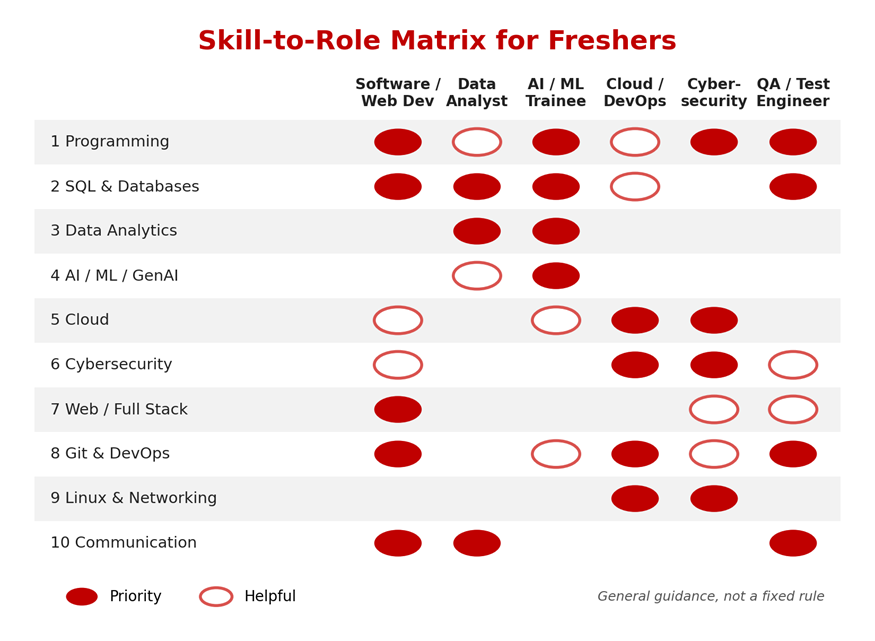
Figur: Skill-to-role matrix (general guidance)
A Simple 90-Day Plan to Become Job-Ready
A plan you follow beats a perfect plan you never start. Here is a realistic structure for a student or fresher studying 1.5 to 2 hours a day.
|
Period |
Focus |
Output |
|
Days 1 to 30 |
One programming language, SQL, Git |
GitHub account with 2 small projects |
|
Days 31 to 60 |
A specialisation: web, data, cloud or AI basics |
One substantial project, deployed or published |
|
Days 61 to 90 |
Resume, LinkedIn, mock interviews, communication |
Updated resume and 5 mock interviews done |
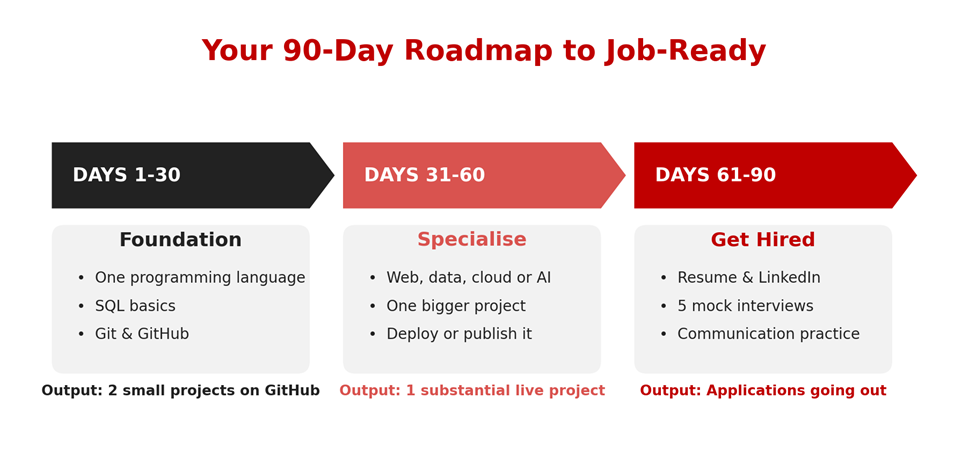
Figure: 90-day roadmap
Where Should Your Study Time Go?
Many freshers spend most of their time watching tutorials and very little time building. The chart below shows a suggested way to split your study hours across the 90 days. It is our recommended plan, not survey data or a recruiter statistic, so adjust it to your own situation.
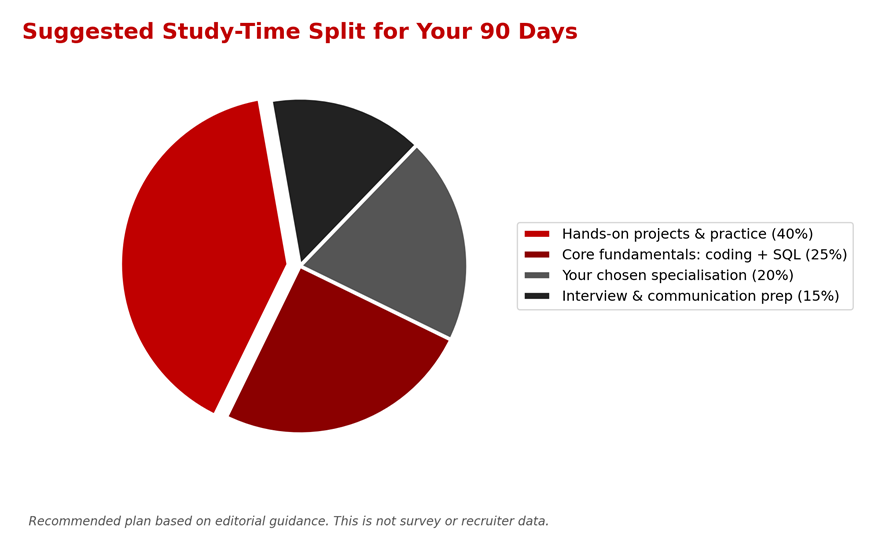
The largest slice goes to hands-on work because building is where concepts stick. If you are two weeks from interviews, shift more time into the interview slice. If your fundamentals feel shaky, spend more time there before you specialise.
Beginner vs Advanced: How Deep Should You Go?
Freshers often worry that they are not "advanced" enough. In reality, most employers expect solid beginner-level depth in several areas and a stronger level in one or two. The table shows a realistic split.
|
Skill |
Fresher Level (Enough to Start) |
Later Growth (Not Needed on Day One) |
|
Programming |
Core syntax, OOP, basic data structures, clean code |
System design, performance tuning, design patterns at scale |
|
SQL |
JOINs, aggregation, simple subqueries |
Query optimisation, indexing strategy, stored procedures |
|
Cloud |
Core services, one hosted project |
Multi-region architecture, cost optimisation, advanced certifications |
|
AI / ML |
Basic models, responsible AI tool use |
Model deployment, deep learning research, MLOps |
|
Security |
Common attacks, secure coding habits |
Penetration testing, threat modelling, incident response |
|
Git / DevOps |
Branching, pull requests, simple CI |
Container orchestration, infrastructure as code |
Project Ideas That Prove Your Skills
A project does not need to be original in idea. It needs to be complete, explained well and slightly different from the tutorial version. Pick one from your target track and add one feature of your own.
|
Track |
Beginner Project |
Stretch Version |
|
Web / Full Stack |
Task manager with login |
Add roles, email reminders and deployment on a cloud platform |
|
Data Analytics |
Sales dashboard from a public dataset |
Add automated data cleaning and a written insights summary |
|
AI / ML |
House or loan prediction model |
Add an error analysis section and a small web interface |
|
Cloud / DevOps |
Static site hosted on a cloud service |
Add a CI/CD pipeline that deploys on every commit |
|
Cybersecurity |
Secure login form with password hashing |
Add input validation tests and a short vulnerability report |
|
QA / Testing |
Manual test cases for a sample website |
Add automated tests with a framework and a bug report template |
How to Show These Skills on Your Resume and GitHub
Recruiters often spend very little time on a first look at a resume, so structure matters. Put your strongest proof near the top and make every line specific.
1. Header: name, phone, professional email, LinkedIn and GitHub links.
2. Summary (2 lines): your target role and your top three skills.
3. Skills: grouped by type (languages, databases, tools), listing only what you can discuss in an interview.
4. Projects: two to four, each with the problem, your role, the tools and a link.
5. Education and certifications: brief, with relevant coursework only.
Write project lines as action plus result. For example:
|
Example project bullet Built a task manager web app using React and Node.js with login and a PostgreSQL database; deployed it online and documented the API in the README. Notice the structure: what you built, with which tools, what it does and where to find it. Avoid vague lines like "worked on a web project". |
On GitHub, pin your best projects, write a README for each (what it does, how to run it, a screenshot) and keep your commit history honest. A smaller, tidy profile looks better than twenty abandoned repositories.
How to Prepare for Interviews
Once your resume gets you the interview, preparation shifts from learning new topics to communicating what you already know. The chart below ranks what to practise first, based on common interview practice.
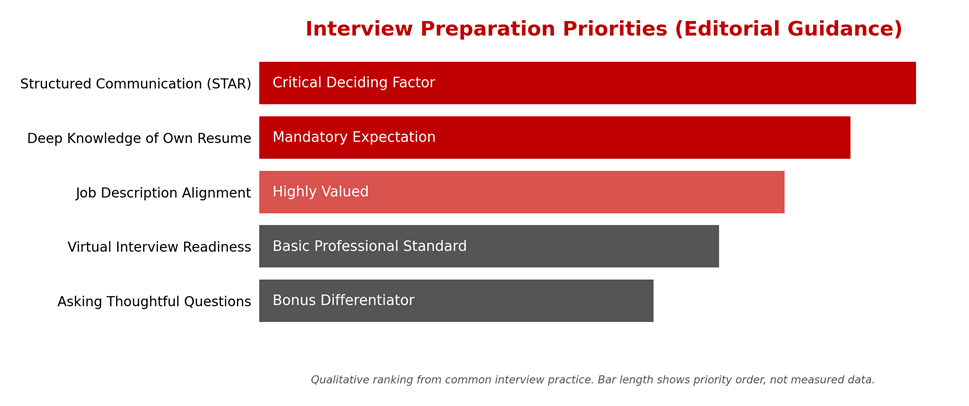
Figure: Interview preparation priorities (editorial guidance, not measured data)
Using the STAR Method
STAR stands for Situation, Task, Action, Result. It helps you answer behavioural questions without rambling. Here is how it works for the question "Tell me about a time you got stuck."
|
Step |
What to Say |
Example |
|
Situation |
Set the scene briefly |
My login feature kept failing during testing in my final-year project. |
|
Task |
State your responsibility |
I had to fix it before our demo in three days. |
|
Action |
Explain what you did |
I checked logs, reproduced the bug, found a token expiry error and wrote a test. |
|
Result |
Share the outcome and learning |
The bug was fixed, the demo went well, and I now add tests for edge cases. |
Interview Day Checklist
• Know every line of your resume. Expect questions on any tool or project you list.
• Read the job description and match two or three of your projects to its requirements.
• Test your camera, microphone and internet before a virtual interview.
• Prepare two thoughtful questions about the team, tools or onboarding process.
• Keep a short note on your weak areas and say honestly what you are learning.
Quick Self-Check: Are You Job-Ready?
Tick yes or no for each statement. If you have more than three "no" answers, that is your study list for the next 30 days.
• I can solve basic coding problems in one language without copying a solution.
• I can write a SQL query with a JOIN and a GROUP BY from memory.
• I have at least two projects on GitHub with README files.
• I can explain one project in two minutes, including what went wrong.
• I can use an AI assistant and still verify and explain its output.
• I know the basics of one cloud platform and one security habit I apply.
• I have done at least three mock interviews.
Common Mistakes Freshers Make
• Collecting certificates without building anything. Recruiters ask about projects, not course completion.
• Learning ten tools at a shallow level. Depth in two or three skills beats a long list.
• Copying tutorial projects exactly. Change the idea, add a feature, and explain your decisions.
• Ignoring communication practice. A good answer that is badly explained still sounds weak.
• Waiting to feel "ready". Apply while you learn and treat each interview as feedback.
Where Structured Guidance Can Help
Self-study works if you are disciplined, but many learners struggle with sequencing, feedback and interview practice. If you prefer a guided route, a learning centre such as upGrad Learning Support Centre, Pune can be a useful next step to explore.
Structured programmes in areas like data, AI/ML, full stack development and digital marketing generally offer a planned curriculum, hands-on projects, mentor guidance and interview preparation. Course content, fees, schedules and eligibility change from time to time, so confirm the latest details directly with the centre before you decide.
Whichever option you choose, ask these questions first:
• Is the curriculum aligned with the skills in this article, and how often is it updated?
• How many real projects will I build, and will I get feedback on them?
• What mentor support and interview preparation are included?
• Is the promise realistic? Be cautious about any programme that guarantees a job or a salary, because no one can honestly promise that.
Get Regular Job Updates
Looking for regular IT job updates, fresher opportunities, and career-related updates? Join our WhatsApp group for more job updates and opportunities.
Join our WhatsApp Group: https://chat.whatsapp.com/KA8HpgjbJ67I5yfQDquCvn
Frequently Asked Questions (FAQs)
Q. Which IT skill should a fresher learn first in 2026?
Start with one programming language and SQL. Together they open the widest range of entry-level roles and make every other skill easier to learn.
Q. Do I need to learn AI to get an IT job as a fresher?
You do not need to be an AI engineer, but basic AI and generative AI literacy is becoming a general expectation. Learn how the tools work and how to check their output.
Q. Is coding compulsory for every IT job?
No. Roles in testing, support, business analysis and some data work need less coding. Even so, basic logic and SQL help in almost all of them.
Q. How many projects should a fresher have on their resume?
Two to four well-explained projects are better than ten unfinished ones. Each should have a clear problem, your role, the tools used and a link to the code or demo.
Q. Are certifications important for freshers?
They can help, especially in cloud and security, but they work best when backed by a project. Treat certificates as support, not as the main proof of skill.
Q. Can non-IT graduates switch to an IT career?
Yes, many do. Begin with SQL, Excel and Python for data roles, or HTML, CSS and JavaScript for web roles, and build a small portfolio before applying.
Q. How long does it take to become job-ready?
It depends on your starting point and daily effort. A focused learner can build a credible base in roughly three to six months, but timelines vary from person to person.
Conclusion
The best IT skills for freshers in 2026 are a mix of fundamentals and adaptability: programming, SQL, data handling, cloud and security awareness, comfort with AI tools, and the ability to communicate what you build. The WEF Future of Jobs Report 2025 supports this direction by placing AI, cybersecurity and technology literacy among the fastest-growing skills.
Your practical next step is simple. Pick one target role, choose two or three priority skills from the table above, and build one project in the next 30 days. If you want mentor guidance and structured practice, you can also explore what upGrad Learning Support Centre, Pune offers for your chosen path.
And if you want regular job and fresher opportunity updates, use the WhatsApp group link in the "Get Regular Job Updates" section above